ESL Noncredit
Lifelong Learning
Noncredit Business Life Skills
Parent Education
Before you begin registration, make sure you have:
STEP 1: Go to www.glendale.edu and then click on Canvas
STEP 2: Click on the red button Canvas Login
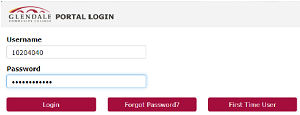
STEP 3: Enter your Student ID Number and Password and click on Login
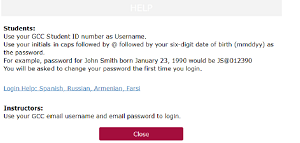
If it is your first time, click on First Time User and follow the directions for your first-time password. Then you can reset your password to a permanent password.
If you need any assistance with Canvas for resetting your password, call us (818) 240-1000 ext. 5092 or 5678